
PMR Frequency
Band: 446.0–446.2 MHz
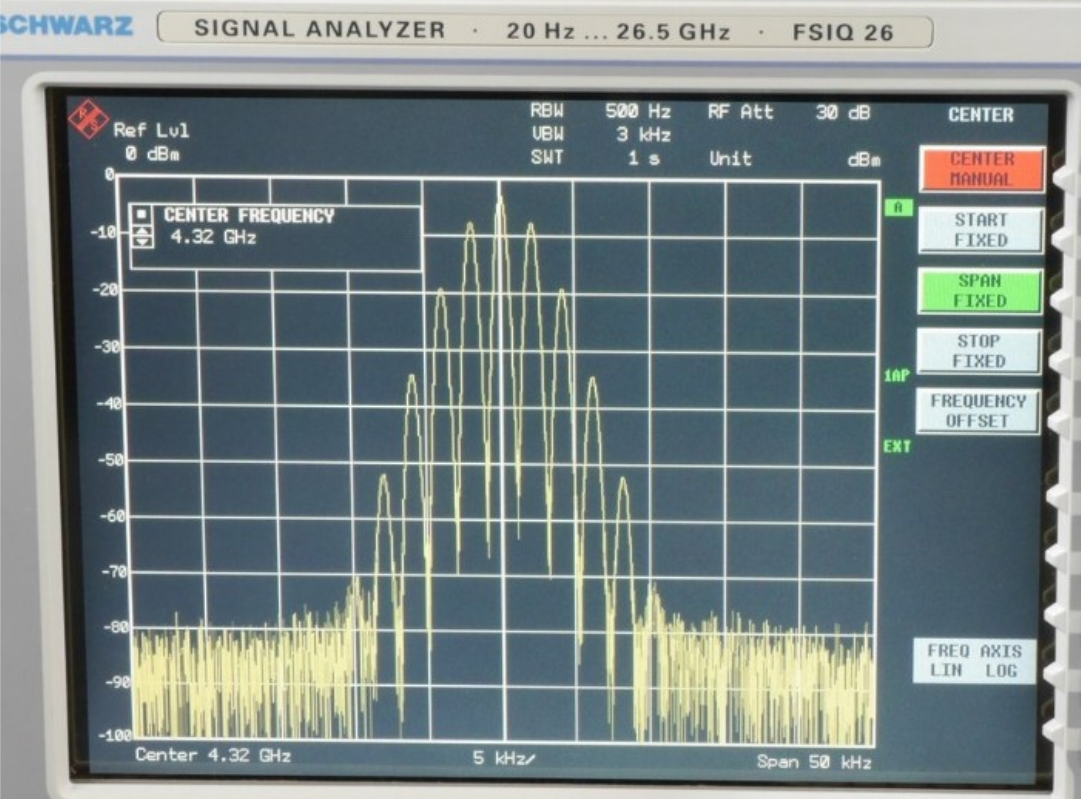
Analog PMR446 uses narrow FM in a 12.5 kHz raster, 16 channels.

dPMR uses FDMA in a 6.25 kHz raster, 32 channels.
dPMR -> NXDN -> 4FSK/FDMA
Used by Icom IC-U20SR
PMR446 DMR (Tier 1) uses TDMA in a 12.5 kHz, 16 channels.
Both digital codes uses 4-level FSK modulation at 3.6 kbit/s
Source: https://en.wikipedia.org/wiki/PMR446
Complete overview in Dutch:
https://www.groveld.com/articles/pmr-frequencies
https://www.rtlsdr.nl/pmr-446mhz
ICOM CS-F52D programming software – add zone
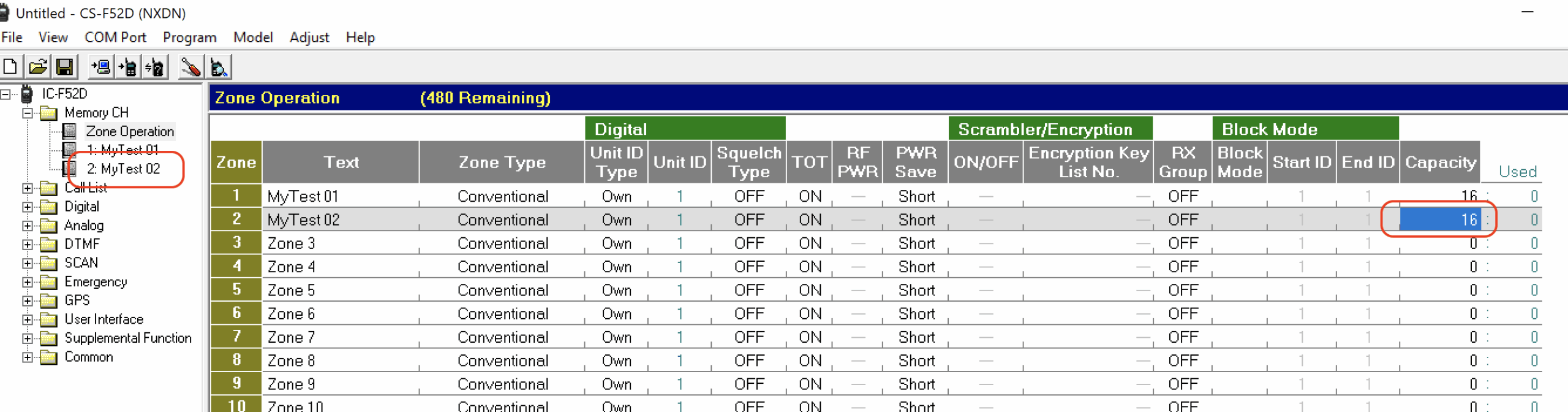
Question: Can I add multiple zones to ICOM F52D and F62D NXDN handheld radios? I currently only have one zone, and I can’t figure out how to add more.
Answer: To add a zone, the Capacity field needs to be entered first. See the screenshot of the CS-F52D programming software. This information is missing from the help file and documentation.
Windows updates fails on KB5034441: Windows Recovery Environment update for Windows 10, version 21H2 and 22H2: January 9, 2024
Open PowerShell with Administrator rights and first allow to run a PowerShell script:
set-executionpolicy remotesigned
Script:
Add an update to Windows RE | Microsoft Learn
Activate Windows license
Try the following command in command promt when the wizard fails.
slmgr /ipk activationcode
Must have Windows apps for MacOS users
Get both apps from the Microsoft Store:
Microsoft PowerToys preview releases at GitHub
LED dimmer
Leading Edge (RL), dimming range: 40% (Dutch: Fase aansnijding) Mostly used for non LED bulbs, like incandescent and halogen)
Trailing of Cutting Edge (RC), dimming range: 100% (Dutch: Fase afsnijding)
Add NTP server to the NTP Client list
How to add an adition NTP server to Windows 10, open COMMAND:
reg add “HKEY_LOCAL_MACHINE\SYSTEM\CurrentControlSet\Services\W32Time\Parameters” /v NtpServer /t REG_SZ /d “pool.ntp.org,0x1 time1.google.com,0x1 time.windows.com,0x9” /f
Restart the service:
sc config W32Time start=auto
Verify the configuration:
w32tm /query /configuration
Thanks to: techexpert.tips
Enable NTP server service in Windows 10
Use Windows 10 as NTP Server.
Open the command prompt (cmd) as administrator and fire the following commands:
- Enable the NTP server service
net stop W32Time
reg add “HKEY_LOCAL_MACHINE\SYSTEM\CurrentControlSet\services\W32Time\Config” /v LocalClockDispersion /t REG_DWORD /d 0 /f
reg add “HKEY_LOCAL_MACHINE\SYSTEM\CurrentControlSet\Services\W32Time\Parameters” /v LocalNTP /t REG_DWORD /d 1 /f
reg add “HKEY_LOCAL_MACHINE\SYSTEM\CurrentControlSet\services\W32Time\TimeProviders\NtpServer” /v Enabled /t REG_DWORD /d 1 /f
reg add “HKEY_LOCAL_MACHINE\SYSTEM\CurrentControlSet\services\W32Time\Config” /v AnnounceFlags /t REG_DWORD /d 5 /f
sc config W32Time start=auto
net start W32Time
2. Check if the NTP server is enabled
w32tm /query /configuration
See in the output the 2nd last line, Enabled: 1 (local) is correct.
NtpServer (Local)
DllName: C:\Windows\system32\w32time.dll (Local)
Enabled: 1 (Local)
InputProvider: 1 (Local)
3. Allow rule in the firewall
netsh advfirewall firewall add rule name=”NTP Server” dir=in protocol=udp localport=123 profile=any enable=yes action=allow
4. Test the service from external system
w32tm /stripchart /computer:192.168.0.10 /samples:4 /dataonly
Enable PING reply in Windows 10
To enable PING reply in Windows 10 the firewall needs to allow the ping request.
Open the command prompt (cmd) with administrator rights and fire the following command.
netsh advFirewall Firewall add rule name=”PING IPv4 allow” protocol=icmpv4:8,any dir=in action=allow
EFF – Is your browser safe against tracking?
When you visit a website, online trackers and the site itself may be able to identify you – even if you’ve installed software to protect yourself. It’s possible to configure your browser to thwart tracking, but many people don’t know how.
Panopticlick will analyze how well your browser and add-ons protect you against online tracking techniques. We’ll also see if your system is uniquely configured—and thus identifiable—even if you are using privacy-protective software.
